
Scheduling & Managing Courses, Activities, Events and More
Trips | Routes & Places | Clinics & Seminars | Courses with Lectures & Field Trips | Events | Lodge Stays
New volunteer support tools
Our new Volunteer Support Tools are your go-to guide for navigating our website, standards, and policies so you can spend less time searching for processes and completing administrative tasks and more time fostering adventures.
NEW! Set a Non-Priority Registration Date
We’ve introduced a new activity field called Non-Priority Registration Date. This helps manage trips with priority registration periods.
What is it?
If your activity has a priority group that registers first (e.g., “Priority registration for backpacking students until July 3”), then set the Non-Priority Registration Date to the date when registration opens to everyone (in this example, July 3).
Why does it matter?
- This date ensures that trips are correctly filtered for members who qualify.
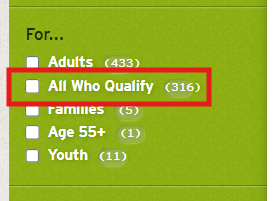
- Activities outside the priority period will automatically show the “All Who Qualify” audience tag.
How it works:
- If the field is empty, the system will add the “All Who Qualify” tag when the activity is created. This is how folks will be able to filter trips in the activity search that are not in a priority registration period.
- If you set a date, the tag will appear when that date arrives.
NEW! allow overlapping waitlists
The Mountaineers activity registration pages now allows participants to join more than one waitlist, even if the activities overlap on the calendar, but only if each activity has this option turned on. This gives participants more flexibility while waiting for a spot to open.
Things to know:
- Leaders must check the box labeled “Allow participants on a conflicting waitlist to join this activity’s waitlist” when creating the activity. This setting is not turned on by default and can be found under registration dates.

- To be on multiple waitlists, all of the activities participants are joining must have this box checked.
- Participants can waitlist for multiple overlapping activities, but they can only be registered for one activity at a time.
- Once Participants are taken off a waitlist and registered for an activity, they will automatically be removed from any other waitlists.
- If a Participant wants to join a different waitlist after being registered, they will need to cancel their current registration first.
- There is no limit to how many waitlists can be joined, as long as the above items are met.
When registering for an activity, Look for a yellow message box during registration that says “This activity allows you to be on multiple waitlists”. That means the multiple waitlist feature is active for that activity.
TRIPS
- Activities where we explore the Pacific Northwest and beyond by foot, kayak, snowshoe, ski, or another human-powered mode of travel.
- Participants might learn something, but there is no direct educational component.
- Registration and signed waiver are required.
- Rosters must be updated and the activity closed when complete.
- They are connected to a route/place to prevent conflicts at that location.
- All trips are in the Find Activities search.
- Activities for which you are registered (participant or leader) are listed on your profile's My Activities page.
If you're a leader and you already know what to do... Schedule an Activity
If you are new to scheduling and managing activities, check out out frequently asked questions and blog about activity listings may help. For more information, visit:
How to Schedule & Manage Activities
Routes & Places
We use Routes & Places as the starting point for adding activities. This includes our trips, clinics, seminars, and course lectures & field trips.
Found a route/place that needs to be updated or could be improved? Have new images or resources to add to an existing route/place? Please complete the Route/Place Updates, Images & Resources Form.
Need a new one? Review How to Request New or Updated Routes & Places to learn all about Routes & Places and how to add one.
Clinics & Seminars
- Activities that are one-time and provide skill-based education, like learning how to roll a kayak or refreshing steep snow climbing skills. This differs from courses where you learn a variety of skills over a longer period of time.
- They are connected to a route/place to prevent conflicts at that location.
- Registration and signed waiver are required.
- Rosters must be updated and the activity closed when complete.
- All clinics and seminars are in the Find Activities and Find Courses, Clinics & Seminars searches.
- Clinics and seminars for which you are registered (as both a participant or leader) are listed on your profile's My Activities page.
Has your committee sponsored a certain clinic before, and would like to sponsor it again? If so, you can reuse the template. To do this, go to the route/place where you would like your next clinic or seminar to be held, select "seminar or clinic", and choose your committee. On the next page, all templates created by your committee will be shown.
Is it a new clinic or seminar, or do you have additional questions and need more help? If so, please visit:
How to Schedule & Manage Clinics & Seminars
COURSES with lectures & field trips
- Courses are multi-day, multi-part, skill-based education.
- They include more than one course-related activity like lectures, workshops, field trips, and practice sessions. If your course is only one day, it should be listed as a clinic or seminar!
- Registration and signed waiver are required.
- They include the ability to manage students, graduates, equivalency candidates, and equivalents.
- Lectures and field trips are connected to a route/place to prevent conflicts at that location.
- All courses are in the Find Course, Clinics & Seminars search.
- Courses and their activities, clinics, and seminars for which you are registered (for all students, graduates, leaders, or instructors) are listed on your profile's My Courses page.
Because courses have multiple components, they are a bit more complicated to set up than any other types of programs we schedule. To learn about scheduling a course, visit:
How to Schedule & Manage Courses with Lectures & Field Trips
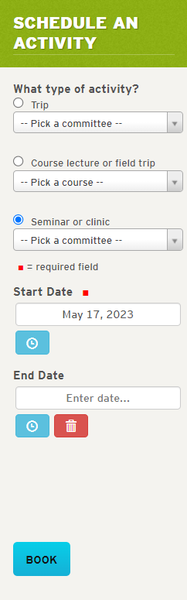
Just need to schedule a course-related activity? If it's a lecture or field trip that has been listed previously with the course, go to the desired route/place and choose the "Course lecture or field trip" button:
Schedule a Course-related Activity
events
- Events are generally in-town, inside, and sit-down, with a focus on meeting others, discussing topics, or watching programmed content. Events may also be fully virtual or hybrid.
- We also use events for room reservations at our program centers whether it's for a standalone event, a committee meeting, or a room reservation for a private gathering or Mountaineers activity.
- Find events near you on our Upcoming Events page.
- You can download events to post to your own personal calendar (iCal and vCal formats).
- Events for which you purchased tickets or RSVP'd are listed on your profile's My Activities page.
Types of Events
- Events with paid tickets or free tickets. For events where we are either selling tickets to an events like a film festival and events that are free but have limited seating or where we want to track attendance like new member meetings and author events.
- Events with RSVP. These are typically used for committee meetings. Everyone must have a profile to register.
- Events with no tickets and no RSVP required. We want to know who's attending events, so this type of event is typically only used for room reservations for private gatherings, course lectures and field trips, clinics, and seminars.
For more detailed instructions on reserving rooms at one of our program centers and adding events to branch calendars, visit:
How to schedule & Manage events
Lodge Stays
- A lodge stay is an overnight stay at one of our three lodges: Baker Lodge, Meany Lodge, and Stevens Lodge.
- They have a fee structure for members and non-members, and adult and youth.
- No waiver is required.
- You may add as many guests to your reservation as desired, regardless of whether the guests have accounts on our website.
- External groups and internal groups for our courses, clinics, and seminars are welcomed by our lodges. Visit our lodge pages (links above) for more information about booking your group's stay.
If you are a lodge administrator and want to learn more tips and tricks about scheduling and managing lodge stays, visit: